
Virgin Atlantic
Virgin AtlanticTravel & Local
4.358.00 Reviews
- Version
- 1.7.0
- Installs
- 100.00K
- Age Rating
- Everyone
Screenshots
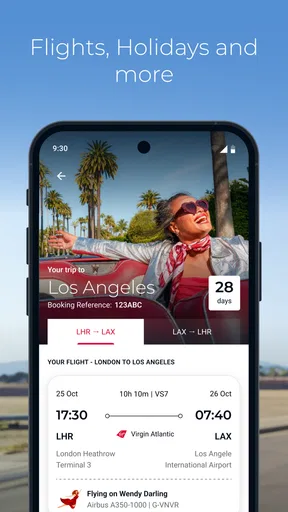
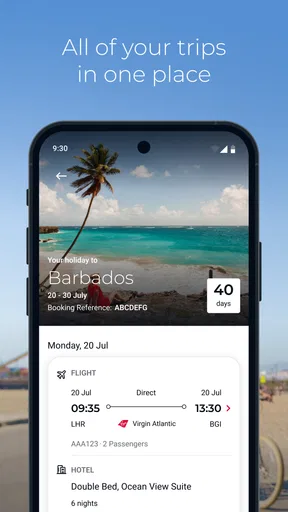

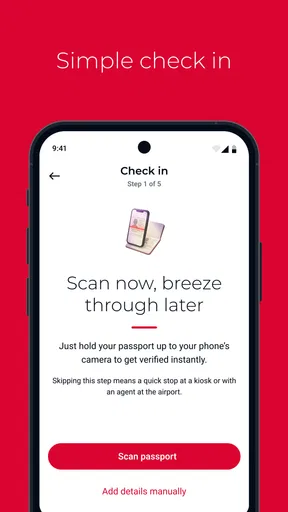
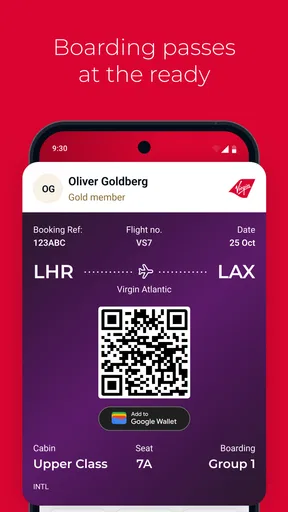

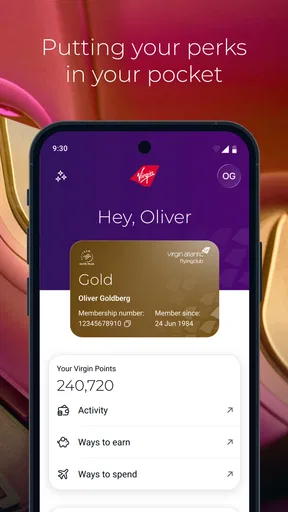
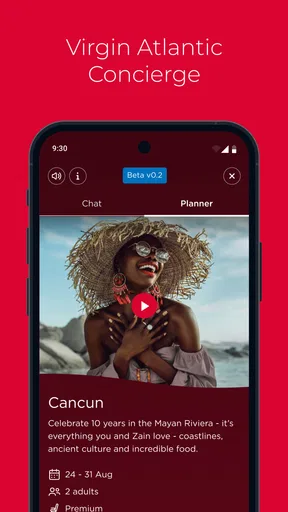
Our Review of Virgin Atlantic
 Analysis by Appyee
I approached Virgin Atlantic as a practical travel companion rather than something to open only on the day of a flight. It is a free Travel & Local app from Virgin Atlantic, built around flights, holidays, and the small decisions that surround a trip. That focus matters: the app feels most useful when I already know I am travelling with the airline and want one place to manage the journey, instead of jumping between a general travel search tool, an airline website, and separate holiday notes.
My overall impression is positive, but it is a focused recommendation. If Virgin Atlantic is part of your itinerary, the app is worth trying because it puts the airline’s travel information close at hand. If you are comparing every airline equally, planning a complex multi-carrier itinerary, or looking for a complete destination guide, I would still keep a broader travel service nearby. The strongest experience comes from using this as the airline-specific layer of a wider travel plan.
How it feels during real travel planning
When I plan a trip, I find it useful to separate the decision-making stage from the day-of-travel routine: broad tools help me compare options, while an airline app can be a more direct place to check the part of the journey tied to that carrier. I’d decide what information I need in a hurry before departure and keep a backup route to it, so the app is a convenience rather than my only plan.
Quick access is more valuable than flashy design
The first thing I look for in a travel app is not decoration; it is how quickly I can reach the information I need when I am distracted, carrying luggage, or standing in a queue. Virgin Atlantic is designed around a fairly clear purpose, so the journey from opening the app to checking a flight-related detail should feel more direct than searching through a general travel platform. That narrow focus is one reason I see it as easier to understand than an app trying to cover every airline and every booking type at once.
There is also a practical difference between browsing flights on a large website and using an airline app on a phone. A website can be better for comparing many options side by side, especially when I am still deciding where to go. The app makes more sense once Virgin Atlantic is the airline I have chosen. At that point, I want a compact travel tool rather than a broad search engine filled with unrelated offers.
The store summary presents it as an app for flights, holidays, and more, while the short description identifies Virgin Atlantic directly. In everyday use, I would interpret that as a companion for Virgin Atlantic travel rather than a neutral booking marketplace. That distinction helps set the right expectation before installing it.
Where the app can save time
A useful workflow is to check the app before leaving home, again while travelling to the airport, and once more after arriving. Before departure, I would use it to keep my airline-related plans together. On the way to the airport, I would prefer a quick mobile check over opening several browser tabs. After landing, the value depends on what part of the trip I still need to organise, but having the airline’s own app ready can be more convenient than finding the correct page through a search result.
One less obvious benefit is mental separation. I like keeping airline actions in the airline app and broader destination research elsewhere. That reduces the chance of confusing a third-party travel confirmation with an airline-specific detail. It is not a replacement for checking every document and travel requirement, but it can act as the place I return to for the Virgin Atlantic portion of the trip.
Users should also expect speed to vary with the situation. Browsing a simple screen should feel lighter than loading changing flight information or holiday content. Travel apps often depend on current online information, so a slow airport connection can matter more than the phone itself. I would not judge the whole experience from one delayed loading moment in a crowded terminal.
What happens during heavier use
The demanding moments are not likely to be ordinary reading. They are the occasions when I am switching between flight planning, holiday browsing, account or booking details, and last-minute checks while the phone is already busy with maps, messages, boarding documents, and battery-saving restrictions. That is where a focused app earns its place: not by replacing every travel tool, but by reducing the number of separate places I need to consult.
For a normal traveller, I would expect the app to be opened in short sessions rather than left running all day. That is a good pattern for both responsiveness and battery use. I would check what I need, close it, and return later. Keeping any travel app open continuously is rarely worthwhile, especially when the journey already involves navigation, camera use, and other battery-heavy tasks.
A realistic example is a family travelling for a holiday. One person may be checking the route to the airport, another may be looking after passports and luggage, and someone may need to confirm the airline part of the plan. In that situation, the app is most useful when it reduces searching and gives the family a familiar place to begin. It does not remove the need for backup documents, but it can make the digital part of the routine less scattered.
For frequent travellers, the trade-off is slightly different. A dedicated airline app may be faster for repeated Virgin Atlantic journeys because I do not need to re-learn a third-party interface each time. However, if my work regularly involves several airlines, I would not rely on this app alone. A general itinerary manager may provide a broader overview, while Virgin Atlantic remains the better specialist tool for the flights it covers.
Stability and recovering when travel gets messy
Reliability matters more in a travel app than in many casual apps because the timing is unforgiving. A small delay while I am relaxing at home is annoying; the same delay at the airport can create stress. My preferred way to use Virgin Atlantic is therefore cautious: open it before I need it, review the important details while I have a stronger connection, and keep essential confirmation information available in another form when possible.
That preparation is not an accusation against the app. It is simply sensible travel practice. Mobile service can be inconsistent inside terminals, on public transport, or during international travel. If a screen takes longer to load, I would first check the connection, move to a better signal, and retry rather than repeatedly tapping every control. Restarting the app is another straightforward recovery step if a page appears stuck.
The app’s airline-specific role also helps recovery because I know where to look first after reopening it. A broad travel platform may contain the booking, but its menus can vary depending on how the reservation was made. With Virgin Atlantic, the natural first stop is the airline’s own application. That does not guarantee that every problem is solved inside the app, and I would still use official support channels for issues requiring human assistance, but it gives me a sensible starting point.
I would be careful not to treat a mobile app as the only source of truth during a disrupted journey. If plans change, I would cross-check the current information and keep any important travel documents accessible outside the app. The best recovery strategy is layered: use the application for convenience, retain the booking information I already have, and avoid depending on one screen when time is tight.
Phone requirements and practical device limits
Virgin Atlantic is available for devices running Android version ten or later, which places it within reach of many modern phones while excluding older software. That requirement is worth checking before a trip rather than discovering it after an upgrade problem or while using an ageing spare handset. Anyone travelling with an older device should plan an alternative way to access their booking information.
The application is free, and its content rating is Everyone, so it is suitable for a broad audience. Those points make it easy to recommend as a household travel app, including for families who want a straightforward airline tool without paying an additional app fee. Free installation does not mean every part of a trip is handled automatically, though; the usefulness still depends on having the relevant Virgin Atlantic travel context.
Resource demands should be considered realistically. A travel app is normally used intermittently, but loading current travel information can be more demanding than reading a static note. On an older compatible phone, I would close unused apps, keep enough storage available for normal updates, and avoid starting the journey with a nearly empty battery. These are small preparations, yet they make a noticeable difference when the phone is also being used for tickets, maps, translation, and communication.
The current version is 1.7.0, so I would keep the app updated before travelling rather than waiting until the airport. Updating at home gives me time to sign in again or become familiar with any changed layout. I would also avoid deleting it immediately after booking; a travel companion is most useful when it is already installed and ready before the journey becomes busy.
Who should use it and who should choose something else
I think Virgin Atlantic is a strong fit for passengers who fly with the airline, people arranging a Virgin Atlantic holiday, and travellers who prefer an official airline-specific experience over a crowded comparison platform. It is particularly appealing if I value quick access on a phone and want to keep airline tasks separate from hotel research, maps, and destination inspiration.
It is less convincing as my only travel app when the itinerary includes multiple airlines, rail connections, several independent bookings, or complicated group arrangements. In those cases, a general itinerary organiser can provide the wider picture more effectively. A browser may also be better during the early research stage, when I am comparing routes, dates, and providers rather than managing a chosen Virgin Atlantic journey.
I would also skip relying on it alone if I use a phone that cannot run Android version ten or later, or if I am travelling somewhere with unreliable connectivity and have not prepared offline alternatives. The application can still be part of the plan, but it should not be the only place where essential information exists.
What the user feedback suggests
The app has an average rating of 4.3 from around 950 ratings, with dozens of written reviews, and it has passed the 100K-install mark. I read that level of adoption as encouraging rather than conclusive. It suggests that many travellers find the app useful enough to keep and rate, but a rating cannot predict how it will behave on every phone, connection, booking type, or travel day.
The most useful way to interpret those figures is alongside the app’s narrow purpose. A person who regularly uses Virgin Atlantic may judge it as a convenient companion, while someone expecting a universal travel planner may be disappointed simply because the goals are different. I would install it with that distinction in mind and evaluate it by how well it supports the airline part of my own trip.
My performance verdict
Virgin Atlantic feels like a sensible, focused travel app rather than an all-purpose holiday command centre. Its perceived speed should be best during short, purposeful checks, while heavier moments will naturally depend on online content, the phone, and the connection available at the time. I would not install it on the assumption that it replaces every other travel service, but I would keep it ready when Virgin Atlantic is carrying an important part of my itinerary.
My practical recommendation is to install it before departure, update it while at home, open it once to understand where the key travel information sits, and avoid waiting until the airport to discover that an older device is incompatible. Keep essential documents available separately, especially for a trip involving weak connectivity or several transport providers. That workflow gives the app a fair chance to be useful without asking it to do a job it was not designed to do.
For me, the deciding point is convenience under pressure. A dedicated airline app earns its space when it shortens the path between a travel question and the relevant airline information. Virgin Atlantic does that best for its own passengers. It is free, rated for Everyone, developed by Virgin Atlantic, and available on supported Android devices, making it an easy addition for eligible travellers. If Virgin Atlantic is part of your journey, I would use it as a focused airline companion, while keeping a broader planner and backup documents for everything beyond that role.
Verdict
Strengths of Virgin Atlantic
- Easy mobile check-in and access to digital boarding passes.
- Manage bookings, choose seats, and request special assistance in one place.
- Flight updates and notifications help keep travelers informed.
- Useful Flying Club access for checking points and member benefits.
- Clean interface makes essential travel details quick to find.
Limitations of Virgin Atlantic
- Some features may require an internet connection while traveling.
- App performance can vary during busy travel periods or disruptions.
- Not all booking changes may be completed directly in the app.
- Notifications may be delayed when airport or flight data changes quickly.
- Frequent flyers may find account and reward details limited in depth.
Similar Picks in This Category
View All
Google Maps
Google LLC3.4

Google Maps Go
Google LLC4.1

Booking.com: Hotels & Travel
Booking.com Hotels & Vacation Rentals4.8

Google Earth
Google LLC3.8

Skyscanner Flights Hotels Cars
Skyscanner Ltd4.8

trivago: Compare hotel prices
trivago N.V.4.4
Frequently Asked Questions
What is the Virgin Atlantic app used for?
The Virgin Atlantic app is designed to help passengers manage their journeys from one place. After signing in, you can view upcoming bookings, check flight details, access mobile boarding passes where available, select or review seats, receive travel updates, and manage parts of your Flying Club account. It is particularly useful for keeping essential trip information accessible while travelling, although some services may depend on your route and booking type.
Can I book a Virgin Atlantic flight through the app?
The app may support searching for and booking Virgin Atlantic flights, depending on the current version and your location. It is also useful for reviewing an existing reservation and checking itinerary information. Before confirming a purchase, compare the displayed fare, baggage allowance, seat charges, and any optional extras carefully. Some complex bookings, partner-airline itineraries, or changes may still require the Virgin Atlantic website or customer support.
Can I check in and use a mobile boarding pass with Virgin Atlantic?
Online check-in and mobile boarding passes are available for many Virgin Atlantic flights, but eligibility can vary according to the departure airport, destination, itinerary, and passenger documentation. The app can make the process more convenient by keeping the boarding pass on your phone. However, passengers should still carry valid travel documents and allow extra time at the airport if document verification or a printed pass is required.
Does the Virgin Atlantic app provide live flight updates?
The app can provide useful information about flight schedules, booking status, gate details, and operational changes when data is available. Notifications may help you stay informed about delays, cancellations, boarding, or other important updates, but they should not be your only source of information. Enable notifications and check airport screens as well, since gate assignments and departure information can change quickly.
Is the Virgin Atlantic app free, and what do I need to use it?
The Virgin Atlantic app is generally free to download, although normal mobile data, roaming, or internet charges may apply. To access booking management features, you may need a confirmation code, passenger details, or a Virgin Atlantic Flying Club account. The app requires a compatible Android or iOS device and may need permissions for notifications or storage. Availability of features can differ by operating system and app version.
